
Short-move assistant
Master the tachograph one-minute rule
Updated on 8 August 2026 · by Yann, working truck driver
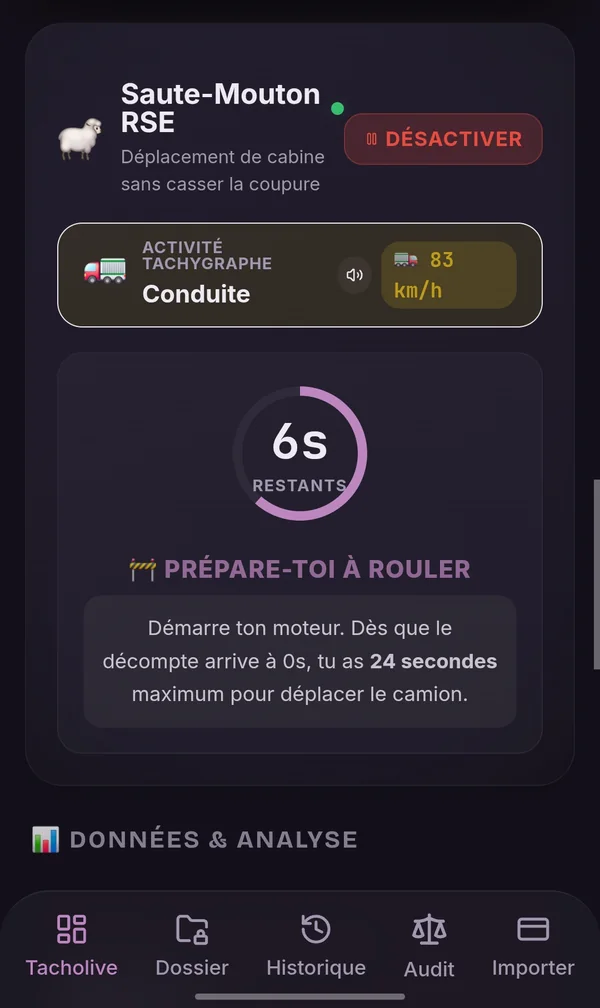
Leapfrog watches the current minute and guides you with sound signals and a countdown when your truck has to be moved a few metres.
⚠ Read this first. The one-minute rule describes the way some tachographs record activity. It is not a general authorisation to drive during a break or a rest. The driver remains responsible for the safety of the move, for the applicable regulations and for using their tachograph correctly.
How the tachograph assigns an activity to a minute
The tachograph does not record down to the second: it works in clock minutes. Each minute on the clock is given one activity, and one only.
- The tachograph splits time into clock minutes and gives each of them a single activity.
- On the generations concerned, it is the longest continuous activity within the minute that wins.
- If two activities have the same continuous duration inside the minute, it is in principle the last one that is kept.
- A minute framed by driving may itself be recorded as driving, according to the applicable technical rules.
- The result therefore depends on the generation of the tachograph and on how it actually behaves.
In other words: a move lasting less than thirty seconds does not mean the minute is "guaranteed" as rest. It is a recording rule, with conditions — not a promise.
One minute, up close
10 s
24 s max
rest of the minute
What the assistant does: it spots the start of the clock minute, gives you 10 seconds to get ready, then counts down 24 seconds of movement before asking you to come to a full stop — the rest of the minute is spent with the vehicle stationary.
Those 24 seconds are a safety margin chosen by the app, deliberately shorter than half a minute. It is not a universal legal threshold. You must be completely stopped before the countdown ends: it is the stop that counts, not the timer.
Second-by-second guidance
- Connection to the tachograph — the assistant uses the direct link with the Smart Tacho 2 to read the current activity.
- Minute detection — the app syncs with the tachograph clock.
- Preparation phase — a countdown tells you when to pull away.
- Audible start signal — a cab beep, so you never take your eyes off the road.
- Timing the move — 24 seconds on screen, with warning beeps in the last seconds.
- Stop detection — the speed read from the tachograph confirms the vehicle is stationary.
- Activity check — the app reads what the tachograph actually recorded and tells you.
You are the one who switches to rest. TruckerMaster never writes into the tachograph: the app reminds you to turn the selector to rest, then checks that the tachograph really did switch to rest and confirms it — or warns you if it did not. Without an active Bluetooth link this check is not possible: follow the countdown and check your own selector.
Why a driver may need to move their truck
Pulling forward a few metres at a loading dock.
Freeing up a space the site staff has asked for.
Moving up in a port queue.
Complying with a safety instruction on an industrial site.
What the assistant is not made for:
- driving in normal traffic during a break;
- stringing together repeated moves to hide driving time;
- getting around the break or rest rules;
- tampering with the tachograph;
- holding your phone in your hand while the vehicle is moving.
Which tachographs apply this rule?
The minute-based recording rule comes from the European technical text, but its exact behaviour depends on the generation of the unit. For the assistant, the ITS Bluetooth link also has to be available.
| Hardware | Connected assistant | Status |
|---|---|---|
| Continental / VDO DTCO 1381 with ITS interface | Yes | Tested on a real vehicle |
| Other Smart Tacho 2 units with ITS Bluetooth interface | To be checked | Not tested to date |
| Tachographs without a Bluetooth interface | No | The countdown still works, without automatic checking of the activity |
The technical basis of the one-minute rule
The way the tachograph records activities comes from the technical annexes of European law. The reference texts:
- Regulation (EU) No 1266/2009 — technical adaptation of the tachograph, which sets out minute-based recording.
- Implementing Regulation (EU) 2016/799 — specifications for smart tachographs.
- Regulation (EC) No 561/2006 — driving time, breaks and rest periods.
Four things not to mix up:
- The technical recording rule describes how the unit assigns an activity to a minute. It says nothing about what is allowed.
- Driving time is framed by Regulation 561/2006: maximum daily and weekly durations.
- A break is an interruption during which the driver does not drive and does no other work.
- Rest is a period of free time whose duration and conditions are set by the regulation.
And above all of that: the driver's responsibility, who remains the only judge of whether a move is appropriate and safe.
Frequently asked questions about Leapfrog
What is the one-minute rule?▾
It is the way the tachograph assigns an activity to each clock minute: on the generations concerned, the longest continuous activity in the minute wins. It is a recording rule of the unit, not a permission to drive.
Is it allowed to move a truck during a break?▾
The recording rule creates no general authorisation. A move during a break or a rest remains subject to the applicable regulations and engages the responsibility of the driver, who judges whether it is appropriate and safe.
Why does TruckerMaster use a safety margin?▾
Because the recording is decided to the second and a driver cannot watch a screen while manoeuvring. The assistant counts down 24 seconds instead of the theoretical half minute, to leave time to come to a complete stop. This margin is a choice made by the app, not a legal threshold.
Does Leapfrog modify the driver card?▾
No. The app modifies neither the driver card nor the secure data of the tachograph. It reads, guides and checks.
Does the app force the tachograph into rest?▾
No. It is up to the driver to turn the selector to rest. The app reminds you to do it, then reads the activity returned by the tachograph to confirm that rest really is recorded — or to warn you if it is not.
Which tachographs are compatible?▾
The connected assistant has been tested on a Continental / VDO DTCO 1381 fitted with the ITS interface. Other Smart Tacho 2 units with that interface are likely to work, but we will not claim it before we have checked it.
Do I need a dongle?▾
No. The link uses the Bluetooth built into the tachograph: no box to buy and none to have fitted in the cab.
Can I use the assistant in a queue or at a dock?▾
That is exactly the intended use case: pulling forward a few metres at a dock or in a queue, on a closed site. The assistant is not designed for driving in normal traffic.
Is the result guaranteed on every tachograph?▾
No. Recording behaviour depends on the generation and the model. That is why the app then checks what the tachograph actually recorded, instead of assuming the result.
Can I hold my phone during the move?▾
No. The guidance is audible precisely so that you do not have to look at or hold your phone. Holding a phone in your hand at the wheel is illegal and dangerous: put it down before you pull away.
Discover the other TruckerMaster tools
See the Smart Tacho 2 live
The Bluetooth drivers' hours cockpit that feeds the assistant in real time.
Understand the drivers' hours rules
Driving time, breaks and rest: the framework that applies to you.
Let TruckerMaster watch the minute
Connect your Smart Tacho 2 and use audio guidance designed for short moves.
Download free on Android