
Direct BLE connection to the Smart Tacho 2
Your tachograph live on your Android phone
Updated on 8 August 2026 · by Yann, working truck driver
TruckerMaster turns more than 25 ITS data items from the Smart Tacho 2 into a clear RSE (driving and rest times) dashboard, with no dongle, no company card and no fleet account.
Requires a Smart Tacho 2 with the ITS Bluetooth interface.
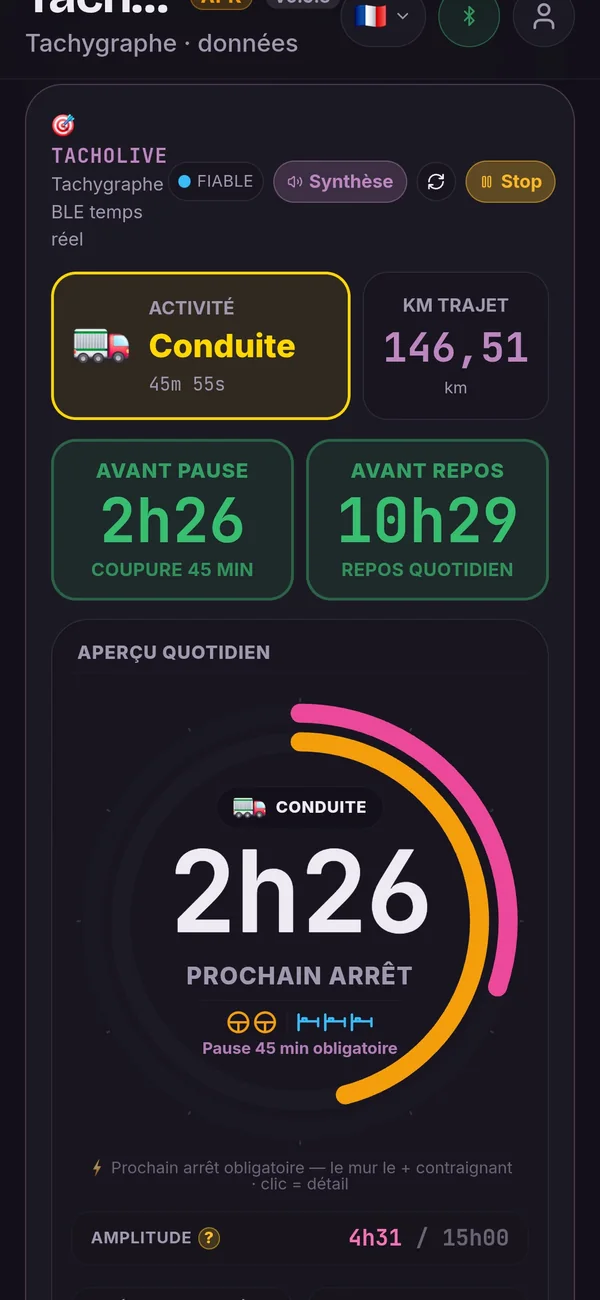
A real driver dashboard, not just a card download
There are several ways to look at your tachograph data, and they do not answer the same need. Here is what makes the direct connection different.
| Method | How it works |
|---|---|
| Card reader | Reads the history stored on the card, once it is plugged in. |
| Fleet tool | Usually depends on the company's equipment or account. |
| Tachograph screen | Shows a few items, buried in successive menus. |
| TruckerMaster | Brings more than 25 ITS data items together live on a single dashboard. |
Not to be confused. The cockpit's BLE connection does not download the full legal file from the driver card. It reads the ITS data the driver has authorised in order to feed the dashboard in real time. To get the complete file from your card you need a card reader: see reading your driver card on Android.
More than 25 useful data items during your day
The cockpit queries the tachograph continuously and sorts the values by use. The most critical counters are re-read on every cycle, the most stable ones once per full cycle.
🚛 Current activity
- Tachograph activity (driving, work, availability, rest) and how long it has lasted
- Instant speed
- Trip distance and total odometer
- Tachograph UTC time
⏱️ Driving and breaks
- Continuous driving since the last break
- Time left before the mandatory break
- Cumulative break in progress
- Driving left for the shift
🌙 Rest and duty span
- Time left before the daily rest
- Duty span of the day and start-of-shift time
- End of the last daily rest
- End of the last and second-to-last weekly rest
- Validation of the 9 h, 11 h and 24 h rests
📅 Weekly counters
- Cumulative weekly driving and driving left for the week
- Cumulative driving previous week + current week
- Driving left over two weeks
- Start of the week and end of the 6-day period
💳 Driver and card status
- 10 h days still available
- Reduced rests still available
- Driver card expiry date
- Deadline for the mandatory download
🚨 Alerts and vehicle
- RSE walls: limits crossed or close
- Sound alert before every limit
- Vehicle registration and authorised speed
- Tachograph identification (manufacturer, version)
This information comes from the ITS data identifiers the tachograph agrees to transmit: 18 counters re-read in a loop while driving, plus 9 identification items read at connection. Some values may be missing depending on the model and the vehicle configuration — the cockpit then shows a dash rather than an estimate.
A known limit, said plainly: on the tachograph we tested, no GPS position is transmitted over Bluetooth. Positions and country changes come from the driver card read with a reader, not from the live cockpit.
Understand your times before you cross a limit
The cockpit does more than display raw figures: it sets them against the limits that apply to you.
- Driving left for the shift, the week and two weeks.
- Break in progress and time left before the mandatory break.
- Rest: validation of the 9 h, 11 h and 24 h rests, with the running countdown.
- Duty span of the day since the start of the shift.
- RSE walls: the limits that are close or already crossed, listed in plain words.
- Sound alert before you reach a limit, so you can keep your eyes on the road.
- Voice summary of your RSE situation, read out loud.
⚠ TruckerMaster is an assistance tool. The information displayed must stay consistent with the approved tachograph, which remains the regulatory reference. An alert does not guarantee the absence of an infringement.
Connecting in a few steps
- Download TruckerMaster on Android.
- Check that the vehicle has a Smart Tacho 2 with the ITS Bluetooth interface.
- Turn on the Bluetooth of your phone.
- On the tachograph, authorise the transmission of ITS data and display the 8-digit pairing code.
- Enter that code in TruckerMaster to pair the phone with the tachograph.
- Open the Tacholive tab: the cockpit fills up as the tachograph answers.
The pairing code is displayed by the tachograph for every new session: it cannot be stored, and that is what guarantees the connection really comes from the driver present in the cab. No company card and no fleet account is involved.
Which tachographs are compatible?
| Manufacturer | Model | Direct connection | Status |
|---|---|---|---|
| Continental / VDO | DTCO 1381 (Smart Tacho, ITS interface) | Yes | Tested on a real vehicle — pairing, 8-digit code and counters verified. No GPS position transmitted. |
| Other brands and models | Smart Tacho 2 with ITS Bluetooth interface | To be checked | Not tested to date — the ITS interface is standardised, but we will not claim it until we have seen it for ourselves. |
Your model is not listed? Check its generation and whether it has the ITS Bluetooth interface. If you try TruckerMaster on a model missing from this table, write to us: a driver's feedback is worth more than a marketing promise, and the list will be updated.
A connection authorised by the driver
- It is the driver who pairs the phone, with the code shown by the tachograph.
- Transmitting personal ITS data requires his consent, given on the tachograph.
- No company account is involved in the cockpit.
- TruckerMaster writes nothing to the tachograph and does not modify the secure data on the driver card.
- The connection is used only to display and analyse your situation.
See how your driver data is protected →
Frequently asked questions about the cockpit
Do I need a dongle?▾
No. The cockpit uses the ITS Bluetooth interface built into the Smart Tacho 2: there is no box to buy or to have fitted in the cab.
Do I need a company card?▾
No. Pairing is done with the code the tachograph shows to the driver present in the cab. No company card and no fleet account is used.
Does the cockpit download the DDD file from my card?▾
No. The direct connection reads the ITS data the driver has authorised in order to feed the dashboard in real time. Downloading the legal file from the card is a different operation, done with a card reader.
Which Smart Tacho 2 units are compatible?▾
We tested the connection on a Continental / VDO DTCO 1381 fitted with the ITS interface. Other models with that same interface are likely to work, but we will not claim it until we have checked it.
Why do I have to authorise the ITS data?▾
Because this information concerns your activity as a driver: the tachograph only transmits it after your agreement, materialised by the pairing code it displays.
Is the information really updated live?▾
Yes. The critical counters — activity, continuous driving, break, time before rest, speed — are re-read on every cycle. More stable values, such as the weekly totals, are refreshed once per full cycle so as not to saturate the link.
Does the cockpit work without an Internet connection?▾
Yes. The link is established directly between your phone and the tachograph, and the analysis runs on the device. An Internet connection is not needed to read your times.
Can TruckerMaster modify my driver card?▾
No. The app modifies neither the driver card nor the tachograph data: it reads, displays and analyses. Choosing the activity is still done on the tachograph selector.
Does the dashboard replace the tachograph screen?▾
No. The approved tachograph remains the regulatory reference during a roadside check. The cockpit simply makes the same information readable at a glance.
What happens if the Bluetooth connection is interrupted?▾
The app reports the drop and tries to reconnect in the background. The last known values stay on screen, clearly identified as such, until the link is restored.
Discover the other TruckerMaster tools too
Compare your driver card with your payslip
The audit that calculates the hours and expenses missing from your payslip.
Discover the Saute-Mouton assistant
Second-by-second guidance for short moves at the dock.
Turn your Smart Tacho 2 into a real driver cockpit
Get your RSE information straight on your Android phone, with no dongle and without depending on your company's tools.
Download free on Android