
Your history, day by day
Your whole driver card in a calendar you can actually read
Updated 8 August 2026 · by Yann, a working truck driver
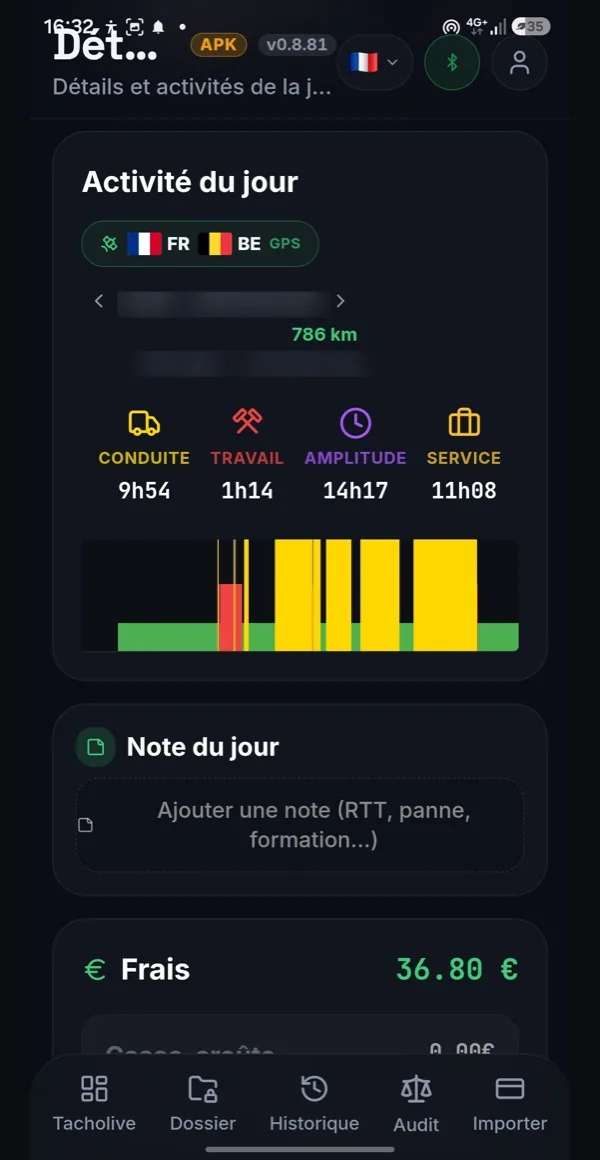
Every day recorded by your tachograph becomes a readable square: driving, work, availability, rest, duty span and expenses.
From the card to the calendar
A driver card is a file no human can read: time-stamped activity blocks, with no formatting at all. TruckerMaster decodes it on your device and turns it into a monthly calendar where each day can be read at a glance.
- Reading with a USB reader plugged into your Android phone, or importing a file you have already retrieved.
- Days that are already there are recognised: no duplicates if you re-import a period.
- Decoding runs on your device, with no connection needed.
Read your driver card on Android →
Open a day, understand your day
Every square of the calendar opens on the real detail of what the tachograph recorded:
🚛 Driving
Every block behind the wheel, with its times and its duration.
🔧 Other work
Loading, unloading, active waiting: service time.
⏸️ Availability
The periods on standby, kept separate from work.
🛏️ Rest and breaks
The interruptions, with their real measured duration.
📏 Duty span
From clocking on to the end of the day.
🍽️ Expenses worked out
Meals and nights away deduced from the real activity.
Understand how your time is split
Beyond the raw hours, the calendar shows the split: what share of your service time is spent behind the wheel, what share on other work. A pie chart and the matching percentages make the comparison immediate from one day or one week to the next.
- Percentage behind the wheel and percentage on other work, measured against your service time.
- Weekly and monthly summaries, with the total hours.
- Annual overview: month by month, with the running total for the year.
- Breakdown of expenses over the period you are looking at.
These figures come from your own days: no estimate, no theoretical average.
A calendar that is actually useful
Compare your driver card with your payslip
The calendar hours feed the audit: when a gap shows up, you trace it back to the date.
Analyse your tachograph infringements
Every overrun detected points back to the day that caused it.
Also worth reading: duty span, service time and breaks — the notions not to mix up.
Your days stay yours
Decoding and keeping your days happen on your device. Nothing is sent automatically, not to your employer, not to anyone else. You can delete a day, a month or the whole lot at any time.
See how your driver data is protected →
Frequently asked questions about the calendar
How do my days get into the calendar?▾
You read your driver card with a USB reader, or you import a file you already have. Each recorded day becomes a square of the calendar, with its activities in detail.
What can I see for a given day?▾
The complete breakdown: driving, other work, availability and rest, with the times, the duration of each block, the duty span of the day and the travel expenses worked out from the activity.
What are the percentages calculated on?▾
On your service time: the share spent behind the wheel and the share on other work are measured against the total worked, which gives you an immediate reading of how your day was split.
Can I look back at a past month?▾
Yes, as long as the days have been imported. You move from month to month, with a monthly summary and an annual overview that adds up what you actually did.
Does the calendar work without a connection?▾
Yes. The days are decoded and kept on your device: you can look at them in the cab, with no network.
What is the calendar for when checking my pay?▾
It is the source of the audit: the hours and expenses the app compares with your payslip come from these days. When a gap shows up, you trace it back to the exact date.
What happens if I import the same period twice?▾
Duplicate days are recognised and merged: you do not end up with hours counted twice.
Can my employer see this calendar?▾
No. The data stays on your device and nothing is sent automatically. You are the one who decides to export a document, if you want to.
Find every one of your days again
Read your driver card and turn months of activity into a calendar you understand.
Download free on Android